Kit App
Publora has an app in the Kit App Store. Once it's installed, every broadcast you send from Kit becomes a post in Publora: the subject, the preview text and a link to the web version of the email. You choose whether that post waits as a draft, goes out at a set time after the broadcast, or goes out right away.
There's nothing to code and no API key to copy. The app signs in to Publora and Kit for you.
Before you start
- A Kit account on a plan that can install apps. Kit's pricing page lists apps on the Creator and Pro plans.
- A Publora account with at least one connected social account. The free Starter plan works, within its limits: 15 posts a month, 3 scheduled posts at a time, scheduling up to 7 days ahead, and no X. See pricing.
Step 1 — Install the app
In Kit, open Apps, search for Publora and click Install.
Kit sends you to Publora first. Sign in if you aren't already, and click Approve to let the app create posts in your Publora account. Kit then asks for its own permission: tick the box and confirm. You land on the app's settings page.
Step 2 — Choose what happens when you send a broadcast
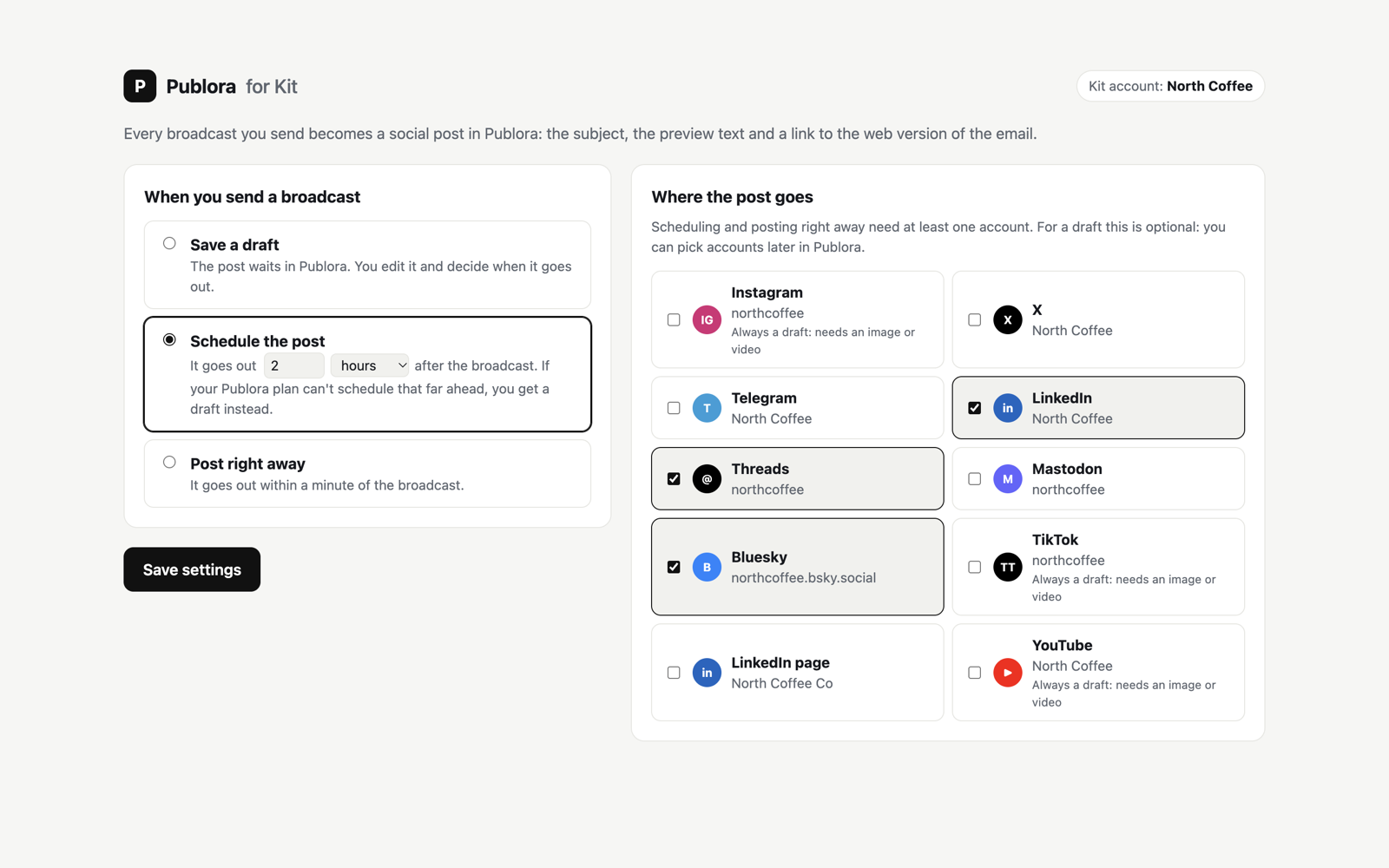
When you send a broadcast
- Save a draft. The post waits in Publora. You edit it and decide when it goes out. This is the default.
- Schedule the post. It goes out a set time after the broadcast: anything from 5 minutes to 365 days, in minutes, hours or days. The time counts from the broadcast's send time in Kit.
- Post right away. It goes out as soon as Kit finishes sending the broadcast.
Where the post goes
Tick the accounts the post should go to. For a draft this is optional; you can pick accounts later in Publora. Scheduling and posting right away need at least one account that can post text, so the page won't save these choices without one.
Click Save settings.
Step 3 — Send a broadcast
Send a broadcast in Kit as usual. When Kit finishes sending it, the post appears in Publora within seconds: as a draft, as a scheduled post, or already on its way to your accounts, depending on your choice.
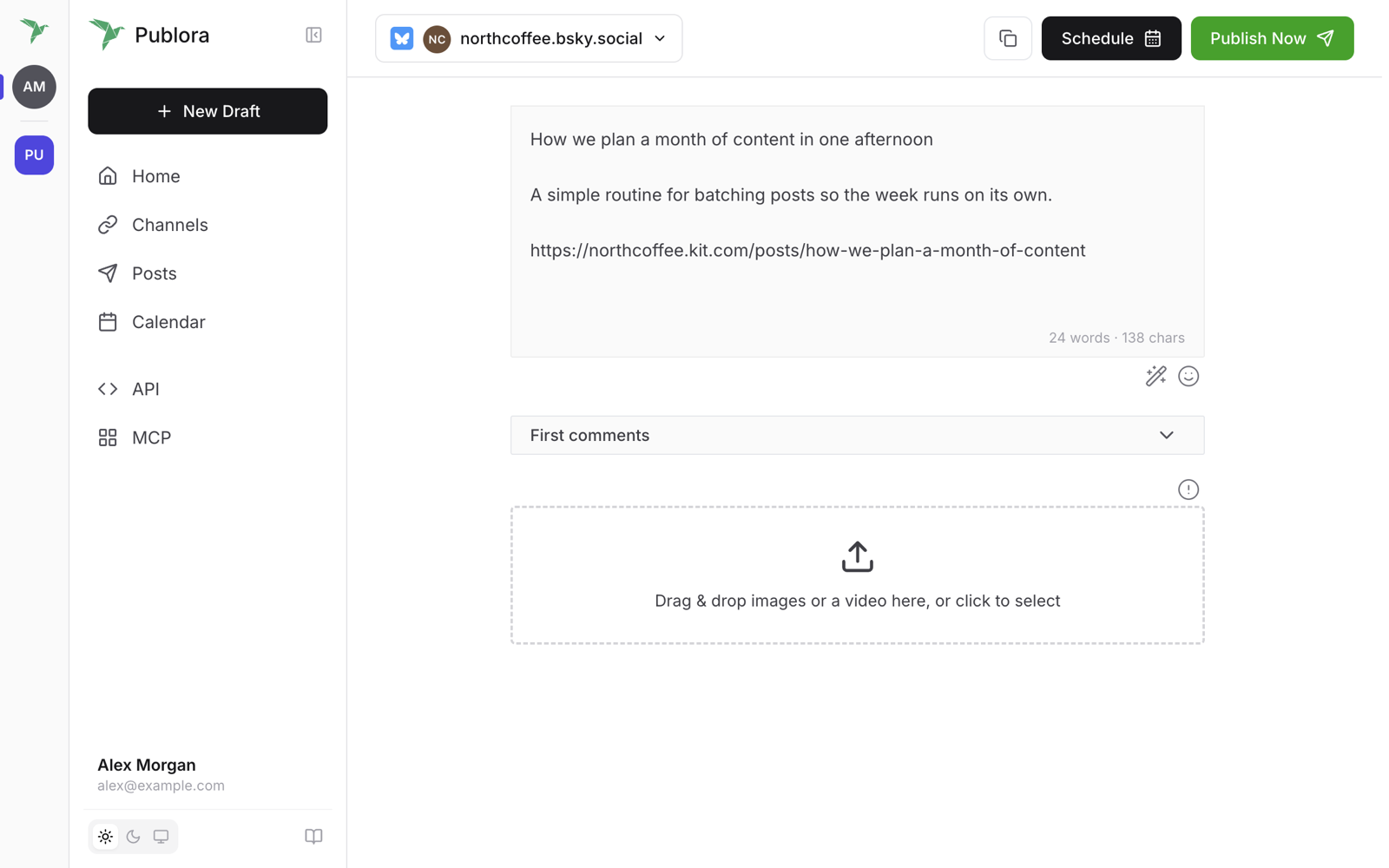
Broadcasts you schedule in Kit work the same way. The post is created when Kit finishes sending the email, not when you schedule it. For a large list, sending can take a while.
What the post contains
- The broadcast's subject.
- Its preview text, or the description if there's no preview text.
- A link to the web version of the email. Kit only has a web version for public broadcasts, so the link is added only if the broadcast is published to your Kit newsletter site.
The text is shortened to fit the shortest limit among the accounts you picked. Bluesky allows 300 characters and Mastodon 500, for example. X and Threads aren't counted, because Publora splits long posts there into a thread.
Instagram, TikTok and YouTube
These networks can't post text alone; they need an image or video. When you schedule or post right away, they get a separate draft in Publora instead. Add the media there and publish from Publora.
Change the settings later
In Kit, open Apps → Manage, click Publora and then App settings. If the page asks you to sign in, click Sign in with Kit.
Disconnect
Click Disconnect at the bottom of the settings page. Publora stops receiving broadcasts, revokes its access to Kit and deletes the Kit and Publora access tokens it stored for this installation.
You can also uninstall the app in Kit under Apps → Manage. Broadcasts stop reaching Publora right away, and the stored tokens are deleted within a day.
Disconnecting doesn't remove the app's access to your Publora account. To remove it too, open MCP in the Publora dashboard and disconnect Publora for Kit. Each install adds its own entry, so if you've installed the app more than once, disconnect every Publora for Kit entry.
What the app reads and stores
The app reads your Kit account name and the broadcasts you send. It doesn't read your subscribers. The app keeps your Kit and Publora access tokens, and encrypts them before storing them. They're deleted when you disconnect. How Publora handles account data in general is described in the privacy policy.
Troubleshooting
- "This link has expired." The sign-in took longer than 30 minutes, or it was opened in another browser. Start the install again from Kit.
- "Kit didn't let Publora listen for new broadcasts." Kit refused to set up the notification Publora uses to hear about new broadcasts. This usually means the Kit plan can't run apps. Check your plan in Kit, then install again.
- A broadcast went out, but nothing showed up in Publora. Check that the app is still listed under Apps → Manage in Kit and that the Publora account it signed in to is the one you're looking at.
- You chose to schedule or post right away, but got a draft. Publora refused the post, so the app saved it as a draft rather than lose it. On the Starter plan this happens when the delay is longer than 7 days, when 3 posts are already scheduled, or when the 15 posts for the month are used up. Check your limits on the pricing page, then schedule or publish the draft from Publora.